Best AI Tools for Logo Generator: Create Professional Logos Easily
Published: 3 Jun 2026
Choosing the right logo creation tool can feel overwhelming when so many platforms promise quick, high-quality results. Each tool offers different features, pricing plans, and design options, which can make it difficult to decide which one truly matches your needs. For businesses, startups, and freelancers, a logo is an essential part of building a strong brand identity, so selecting the right tool is an important first step.
In this guide, we will explore the best AI tools for logo generators and help you understand what makes them effective for modern branding. We will cover their key features, benefits, pricing types, and how they simplify the design process for both beginners and professionals. By the end, you will have a clear idea of which tools can help you create a professional and visually appealing logo quickly and confidently.
What are logo generator tools?
AI logo generator tools are online platforms that help users create logos quickly and easily by using automated design systems. They allow people to generate logo ideas by entering simple details such as business name, industry, and preferred style. These tools make the logo design process faster and more affordable compared to traditional methods. They are especially useful for beginners, startups, and small businesses that do not have professional design skills.
Instead of designing everything manually, users can select from ready-made styles and customize them according to their needs. These tools help turn simple ideas into professional-looking logo designs within minutes. They also allow users to adjust colors, fonts, layouts, and symbols easily. In simple words, they help people create a complete brand logo without needing advanced design knowledge.
These tools use different methods to create logo designs, such as:
- Smart design systems to generate logo styles automatically
- Pre-built templates to provide ready logo layouts
- Customization options to adjust colors, fonts, and icons easily
Benefits of AI Logo Generator Tools
AI logo generator tools have made the logo creation process much faster, simpler, and more affordable. They help users design professional logos without needing advanced design skills or hiring expensive designers.
- Saves Time – Logos can be created within minutes instead of days.
- Cost-Effective – Much cheaper than hiring a professional designer.
- Easy to Use – Simple interfaces allow beginners to design logos easily.
- Multiple Design Options – Provides many logo styles to choose from.
- Customization Flexibility – Users can change colors, fonts, and layouts.
- Instant Preview – Allows users to see logo results immediately.
- Suitable for All Businesses – Works for startups, freelancers, and large companies.
Features of AI Logo Generator Tools
AI logo generator tools provide several useful features that make the logo design process simple and efficient. These features help users create professional logos quickly without need of advanced design knowledge.
- Template-Based Design – Provides ready-made logo layouts to choose from.
- Easy Customization – Allows users to adjust colors, fonts, and icons easily.
- Instant Logo Generation – Creates logo ideas within seconds.
- Industry-Specific Styles – Suggests designs based on business type.
- High-Quality Downloads – Offers logo files suitable for print and digital use.
- User-Friendly Interface – Designed for beginners with simple controls.
- Brand Kit Options – Some tools provide matching fonts, colors, and branding materials.
Types of AI Logo Generator Tools (Free vs Paid)
AI logo generator tools can be classified on the basis of cost into free and paid categories. This classification helps users choose the right tool according to their budget, design needs, and level of customization required.
Free AI Logo Generator Tools
Free logo generator tools allow users to create logos without paying any cost. They are widely used by beginners, startups, and small businesses because they provide basic design features, ready templates, and quick customization options. These tools are easy to use and help users generate logo ideas within minutes.
However, some free tools may have limitations such as watermarked downloads, lower-resolution files, or restricted advanced features.
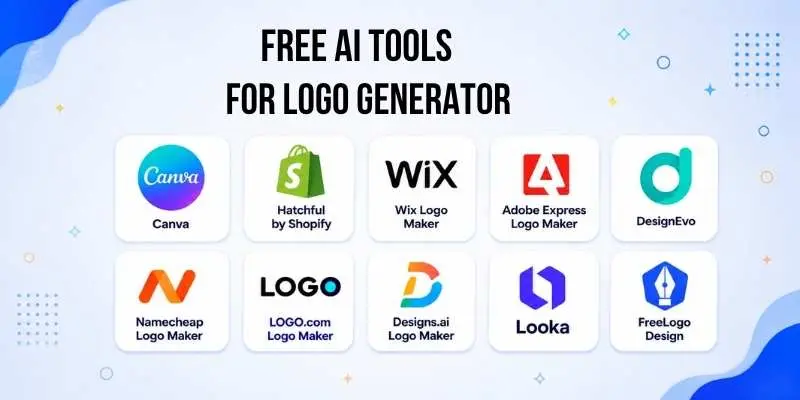
Following are the popular free AI logo generator tools:
- Canva Logo Maker
- Hatchful by Shopify
- Wix Logo Maker
- Adobe Express Logo Maker
- DesignEvo
- Namecheap Logo Maker
- LOGO.com Logo Maker
- Designs.ai Logo Maker
These tools are considered among the best free options because they allow users to create and customize logos quickly using templates, prompts, or automated design systems.
For example, Canva provides thousands of templates and allows users to customize fonts, colors, and icons easily, making it a popular free choice for beginners.
Similarly, tools like Looka and LOGO.com allow users to generate logo ideas for free and only charge if they want to download high-quality files.
Canva Logo Maker
Canva Logo Maker is one of the most popular free tools for creating logos quickly and easily. It provides a simple drag-and-drop interface that allows users to design professional logos without any design experience. Users can choose from thousands of ready-made templates and customize them by changing colors, fonts, icons, and layouts. It is widely used by beginners, small businesses, and freelancers because it makes the logo design process simple and fast.
Another advantage of Canva is that it also offers many additional design elements such as shapes, graphics, and brand kits, which help users create a complete visual identity. It works directly in the browser, so there is no need to install any software.
Canva Logo Maker Includes:
- Ready-made logo templates
- Easy drag-and-drop editing
- Large library of icons and fonts
- Color and style customization
- Instant logo preview
- Free download in standard quality
Best For:
Beginners, small businesses, and anyone who wants to create a logo quickly with easy customization.
Hatchful by Shopify
Hatchful is a free online logo maker created by Shopify to help users design logos in a quick and simple way. It guides users step by step by asking about their business type, style preferences, and brand name. Based on this information, it generates multiple logo ideas that users can choose from and adjust easily. The tool is designed for people who want fast results without spending time learning design skills.
One of the best things about Hatchful is that it also provides ready-to-use logo formats for social media, websites, and business cards. This makes it very helpful for new businesses that need branding materials immediately.
Hatchful Includes:
- Step-by-step logo creation process
- Industry-based design suggestions
- Ready-to-use logo formats
- Simple customization options
- Quick download for digital use
Best For:
New business owners and startups who need a logo and basic branding materials quickly.
Wix Logo Maker
Wix Logo Maker is an online tool that helps users design logos through a simple guided process. It asks a few questions about the business name, industry, and design style, then generates multiple logo ideas based on those choices. Users can edit the suggested designs by changing fonts, colors, icons, and layout to match their brand.
This tool also allows users to preview how the logo will look on different items such as websites, business cards, and social media pages. It works directly in the browser, so no installation is needed.
Wix Logo Maker Includes:
- Guided logo creation process
- Multiple logo suggestions
- Customization of fonts and colors
- Preview on branding materials
- Easy online editing
Best For:
Small business owners and beginners who want a guided step-by-step logo creation experience.
Adobe Express Logo Maker
Adobe Express Logo Maker is a free online platform that helps users design logos in a quick and straightforward way. It allows users to enter their brand name and choose a design style, after which the tool generates a variety of logo options. Each design can be adjusted by selecting different icons, typography, and color themes to match the brand’s identity.
The platform also provides a clean editing workspace that makes it easy to refine the final look. Users can create logos suitable for both digital and print use without needing professional design knowledge.
Adobe Express Logo Maker Includes:
- Automatic logo suggestions based on user input
- Wide selection of fonts and icon styles
- Easy editing interface
- Multiple color theme options
- Download-ready logo files
Best For:
Individuals and businesses looking for a simple tool to create polished logos with minimal effort.
DesignEvo
DesignEvo is a free logo creation platform that offers a large collection of ready-made design layouts for different industries. Users can start by selecting a template and then modify it by adding text, symbols, and color schemes to match their brand style. The tool provides a smooth editing experience and allows users to experiment with different visual combinations easily.
DesignEvo Includes:
- Thousands of pre-designed logo layouts
- Flexible text and icon editing options
- Wide range of color adjustments
- Easy online editing workspace
- Quick logo export options
Best For:
Users who want access to a large variety of ready-made logo styles for quick customization.
Namecheap Logo Maker
Namecheap Logo Maker is a simple platform that generates logo ideas after users enter their business name and select preferred fonts and colors. It creates multiple design variations instantly, allowing users to pick the most suitable option. The interface is clean and easy to navigate, making the design process smooth even for beginners.
Namecheap Logo Maker Includes:
- Instant logo generation based on preferences
- Large selection of font styles
- Color palette customization
- High-quality logo downloads
- No design experience required
Best For:
Entrepreneurs and beginners who want quick logo suggestions with minimal effort.
LOGO.com Logo Maker
LOGO.com Logo Maker is a user-friendly tool that focuses on helping businesses create professional branding quickly. It provides logo concepts after users enter their business details and allows easy adjustments to shapes, typography, and layouts. The platform also offers branding resources that support consistent visual identity.
LOGO.com Logo Maker Includes:
- Automatic logo idea generation
- Editable layouts and design elements
- Branding resource options
- High-resolution logo files
- Simple step-by-step process
Best For:
Businesses that want a fast solution for creating logos along with basic branding materials.
Designs.ai Logo Maker
Designs.ai Logo Maker helps users build logos by selecting style preferences and entering brand information. It produces several design options that can be refined using built-in editing controls. The platform focuses on providing a smooth workflow from idea selection to final download.
Designs.ai Logo Maker Includes:
- Style-based logo generation
- Multiple editable design suggestions
- Easy adjustment of visual elements
- Quick download options
- Clean editing environment
Best For:
Users who want a guided logo creation process with multiple ready design choices.
Paid AI Tools for Logo Generator
Paid logo generator tools are platforms that offer advanced design options and high-quality logo files in exchange for a subscription or one-time payment. These tools not only help users generate professional logo ideas but also provide greater control over design, branding assets, and commercial usage rights.
Many paid tools include full download options, multiple file formats, and brand kits, making them suitable for businesses and professional designers who need polished, ready-to-use logos. While free tools are helpful for basic designs, paid platforms give users access to premium features and higher resolution outputs that are ready for print, web, and marketing purposes.
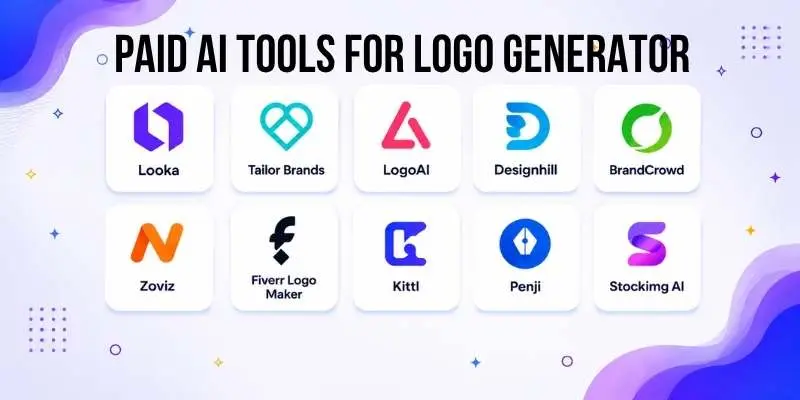
Here are some of the most popular paid AI logo generator tools:
- Looka
- Tailor Brands
- Designhill Logo Maker
- Logogenie
- LogoAI (Logo AI)
- LogoMaker.com
Looka
Looka is a paid logo design platform that creates customized logo concepts based on the name of your business and your style preferences. Users start by choosing colors and fonts, and the tool produces many logo options to choose from. Once you select a design, you can adjust elements before downloading final files in high resolution. Looka also provides brand kits that include social media files and business assets.
Looka Includes:
- Multiple logo concept suggestions
- Brand kit and asset downloads
- Easy color, font, and layout editing
- High-resolution logo files
- Downloadable for web or print use
Best For: Businesses that want professional logos with full brand assets.
Tailor Brands
Tailor Brands offers a range of branding tools, with logo creation at the core. After entering your brand name and design preferences, it presents logo options that can be customized. You can change fonts, icons, and colors with simple controls. Tailor Brands also has additional branding features like business card design and social banners.
Tailor Brands Includes:
- Custom logo suggestions
- Brand asset templates
- Social media and marketing tools
- Multiple font and color choices
- High-quality logo export
Best For: Small to medium businesses that want an all-in-one branding solution.
Designhill Logo Maker
Designhill Logo Maker helps users design and download high-quality logos tailored to their business. It starts with a few questions about the industry and design style, and then generates many logo variations. Each design can be edited using a visual editor. Files are available in multiple formats after purchase.
Designhill Includes:
- Industry-based logo suggestions
- Drag-and-drop editing tools
- Multiple file format downloads
- Vector and high-resolution options
- Professional logo layouts
Best For: Businesses that want flexible editing and versatile logo files.
Logogenie
Logogenie is a paid logo creator that focuses on simplicity and quick results. Users select their industry, choose symbols, and customize fonts and colors to complete their logo. After finalizing the design, logos can be downloaded in high quality. Logogenie is built for those who want straightforward design without complexity.
Logogenie Includes:
- Easy icon and symbol selection
- Color and style adjustments
- High-resolution download options
- Clear editing workspace
- Fast logo creation process
Best For: Users who want a clean and easy logo design experience.
LogoAI (Logo AI)
LogoAI is a platform that generates a range of logo ideas and then lets users refine their favorite options. It focuses on modern design aesthetics and allows users to preview how their logo will look in different real-world uses. Final logos can be purchased with high-quality files and commercial usage rights.
LogoAI Includes:
- Modern logo style suggestions
- Visual previews for branding use
- Easy design refinement tools
- Commercial use download packages
- Multiple export formats
Best For: Brands that want a modern and polished design.
LogoMaker.com
LogoMaker.com is a paid platform that allows users to build and customize logos using a large library of icons and design elements. After entering business details, users can experiment with layouts, fonts, and colors. Final logo files are available in high resolution for websites, signs, and print materials.
LogoMaker.com Includes:
- Large icon and graphic library
- Adjustable text and layout options
- High-resolution logo downloads
- Multi-format export
- Simple online editor
Best For: Businesses that want a professional logo with many graphic options.
Which Logo Generator Tool Is Best for You?
Choosing the right logo tool depends on your needs, budget, and how much control you want over the design. If you are just getting started and want something simple and free, Canva Logo Maker is an excellent choice. It has many ready templates and lets you customize designs easily, even without any design experience.
If you want more professional results and can invest a little money, Looka is one of the best overall options. It offers a wide range of logo concepts, strong editing tools, and a complete brand kit you can use across your business materials. Looka’s designs often feel polished and well-balanced, making it ideal for small businesses, online shops, and personal brands.
On the other hand, if you want a complete branding solution that goes beyond just the logo, Tailor Brands is a solid pick. It not only creates logos but also helps you with business cards, social media visuals, and brand layouts.
In simple terms, if I had to choose one tool for most users, I would recommend Looka because it offers a great balance between ease of use, design quality, and useful features that help you build a full brand identity.
Facts About Logo Generator Tools
- They can create logo designs within minutes instead of days.
- Most tools ask for basic details like business name and style preference before generating designs.
- Many platforms offer both free previews and paid high-resolution downloads.
- Users can edit fonts, colors, icons, and layouts before finalizing the design.
- Some tools provide complete brand kits including social media graphics and business card designs.
- Logo files are usually available in different formats for web and print use.
- These tools are widely used by startups, freelancers, and small businesses.
- They reduce the need to hire a professional designer for simple branding needs.
- Most platforms work directly in the browser without requiring software installation.
- They are designed to be easy to use, even for people without design experience.
Conclusion
In this guide, we examined the best AI tools for logo generators and discussed how they support the creation of professional logos in a simple and efficient way. We reviewed their key features, advantages, free and paid options, and highlighted leading platforms suited for different business needs. From basic logo creation to complete brand packages, each tool offers solutions tailored to various levels of experience and budget.
My recommendation is to choose a platform based on your long-term branding goals. If you are testing an idea or launching a small project, a free option may be sufficient. However, if you are building a serious business or brand, investing in a premium tool can provide better design quality, flexibility, and commercial rights. A strong logo plays a vital role in establishing credibility and recognition in today’s competitive market.
Thank you for reading, folks. Keep refining your brand, keep improving your skills, and stay tuned for more professional insights and guides.
FAQs About AI Tools for Logo Generator
1. How do logo generator tools work?
Logo generator tools let you enter basic details such as your brand name and style preferences. The platform then creates a set of logo designs for you to choose from. You can edit fonts, colours, and icons until you are happy with the result.
2. Can I use logo generator tools without design skills?
Yes, most logo generator tools are very simple to use. They offer ready templates and easy options so beginners can create logos without any design experience. You just pick the design you like and make small adjustments.
3. Are logo generator tools free?
Some tools let you design and preview logos for free, but they often require payment to download high-resolution files or full brand packs. Free options are great for basic usage, while paid plans give you better quality and more features.
4. What file formats do logo generators provide?
Many tools allow you to download logos in formats like PNG, JPG, PDF, or vector files. Vector files are especially useful if you need the logo for printing or large banners.
5. Can I use logos from these tools for my business?
Yes, most tools let you use the logos for personal or business purposes after purchase. Some platforms also include brand kits with multiple formats and assets you can use on websites, social media, and business cards.




- Be Respectful
- Stay Relevant
- Stay Positive
- True Feedback
- Encourage Discussion
- Avoid Spamming
- No Fake News
- Don't Copy-Paste
- No Personal Attacks
- Be Respectful
- Stay Relevant
- Stay Positive
- True Feedback
- Encourage Discussion
- Avoid Spamming
- No Fake News
- Don't Copy-Paste
- No Personal Attacks
